local-storage
Store Data in Browser#
There are different way to store the data locally in a client’s browser and here we will explain one of them, it is the localStorage.
Local Storage#
It is a type of web storage that allows JavaScript sites and apps to store and access data right in the browser with no expiration date. This means the data stored in the browser is accessible to all the pages of the domain and will persist even after the browser window has been closed.
What are some useful use cases for using local storage?#
It is useful for saving data such as user preferences (light or dark color theme on a website).
localStorage methods#
There are four basic JavaScript methods you can use to access and work with localStorage:
setItem(key, value)- takes a key-value pair and adds it to localStoragegetItem(key)- takes a key and returns the corresponding valueremoveItem(key)- takes a key and removes the corresponding key-value pairclear()- clears localStorage (for the domain)key(index)- returns name of the key with the specified index.
Notes#
- You can set key: value pairs.
- You can only store strings.
- You can store arrays and objects, but you have to turn them into strings first, using a method called
JSON.stringify()andJSON.parse()to convert them back. More on this later.
1. setItem(key, value)#
Just as the name implies, this method allows you to store values in the localStorage object.
It takes two parameters: a key and a value. The key can be referenced later to fetch the value attached to it.
example#
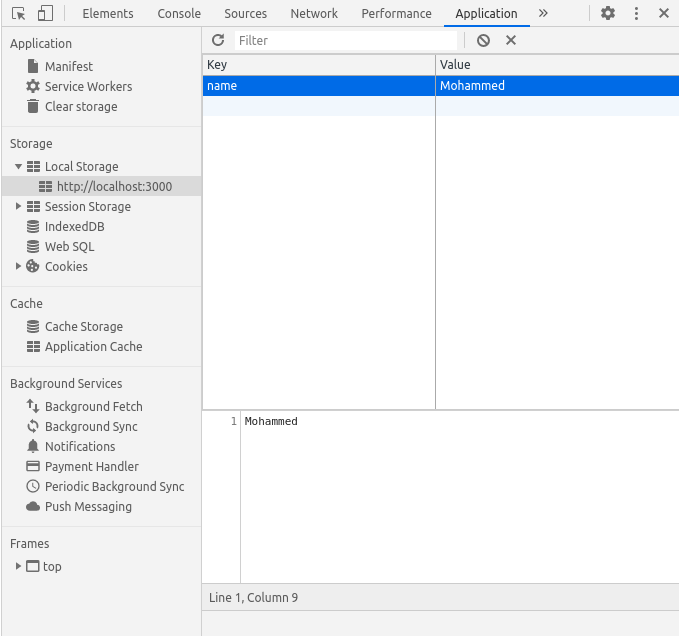
Where name is the key and Mohammed is the value. Also note that localStorage can only store strings.
So, what if we need to store object or array? don't worry, To store arrays or objects, you would have to convert them to strings
To do this, we use the JSON.stringify() method before passing to setItem()
JSON.stringify() Convert a JavaScript object into a string.
example#
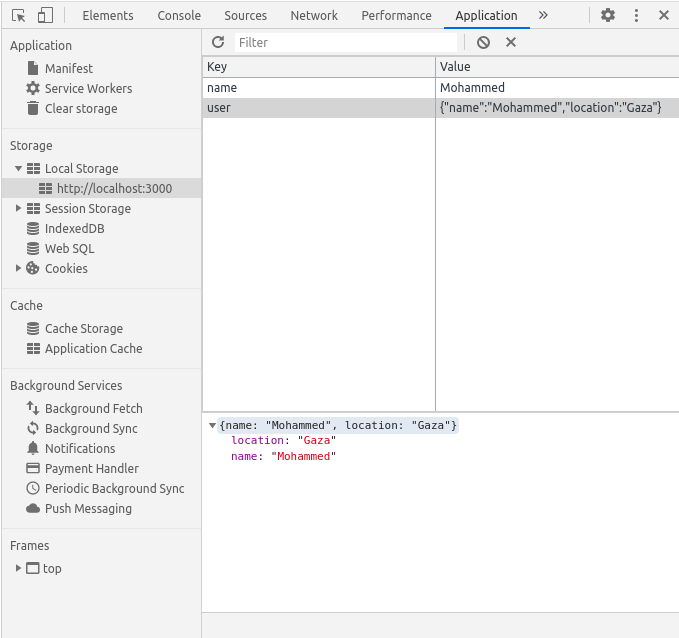
Try to insert object without JSON.stringify() like this and see the result
2. getItem(key)#
The getItem() method allows you to access the data stored in the browser’s localStorage object.
It accepts only one parameter which is the key and returns the value as a string.
To retrieve the user key stored above:
This returns a string with value as:
To use this value, you would have to convert it back to an object.
To do this, we make use of the JSON.parse() method, which converts a JSON string into a JavaScript object.
JSON.parse() Parse the data and becomes a JavaScript object.
and the result will be like this (object)
3. removeItem(key)#
When passed a key name, the removeItem() method will remove that key from the storage if it exists. If there is no item associated with the given key, this method will do nothing.
Try it
4. clear()#
This method, when invoked, clears the entire storage of all records for that domain. It does not receive any parameters.
Try it
5. key(index)#
The key(index) method comes in handy in situations where you need to loop through keys and allows you to pass a number or index to localStorage to retrieve the name of the key.
example#
Browser support#
Some old browser don't support local storage, to be sure the browser supports localStorage, you can check using the following snippet:
LocalStorage limitations#
As easy as it is to use localStorage, it is also easy to misuse it. The following are limitations, and also ways to NOT use localStorage:
- Do not store sensitive user information in localStorage
- It is not a substitute for a server based database as information is only stored on the browser
- LocalStorage is limited to 5MB across all major browsers
- LocalStorage is quite insecure as it has no form of data protection and can be accessed by any code on your web page
- LocalStorage is synchronous, meaning each operation called would only execute one after the other